Docs / Ukemi
Ukemi - Strategy Safety Net
Catch the failures that happen while you are not watching: dropped feeds, silently disabled strategies, naked positions with no stop, and limits creeping up on you.
Last updated 2026-08-25
Ukemi (受け身) is the judo art of falling safely. The product does the same job for automated trading: it assumes something will go wrong and makes sure the fall does not cost you the account.
Four failures cause most automated-trading damage, and all four happen quietly:
- A strategy gets disabled by NinjaTrader after a connection blip and never comes back, so your position sits unmanaged.
- The data feed drops or stalls, and your strategy is trading on stale bars.
- A fill leaves you with a position and no protective stop.
- Your account drifts toward a daily-loss or drawdown limit while you are away.
Ukemi watches for all four and, depending on how you configure it, alerts you, flattens, disables, or recovers.
The two-minute setup
- Open Ukemi from the NinjaTrader Control Center.
- Confirm the toggle at the top left reads Monitoring.
- Leave No-stop alert ticked.
- Tick Use Fudoshin limits if you run Fudoshin, or type your own Daily loss $ and Drawdown $.
- Set Recover to
AlertOnlyfor the first week. Move toAutoReenableonce you trust it.
Ukemi runs as a background service. It starts when the NinjaTrader Control Center opens and keeps monitoring for the whole session, whether or not its window is open.
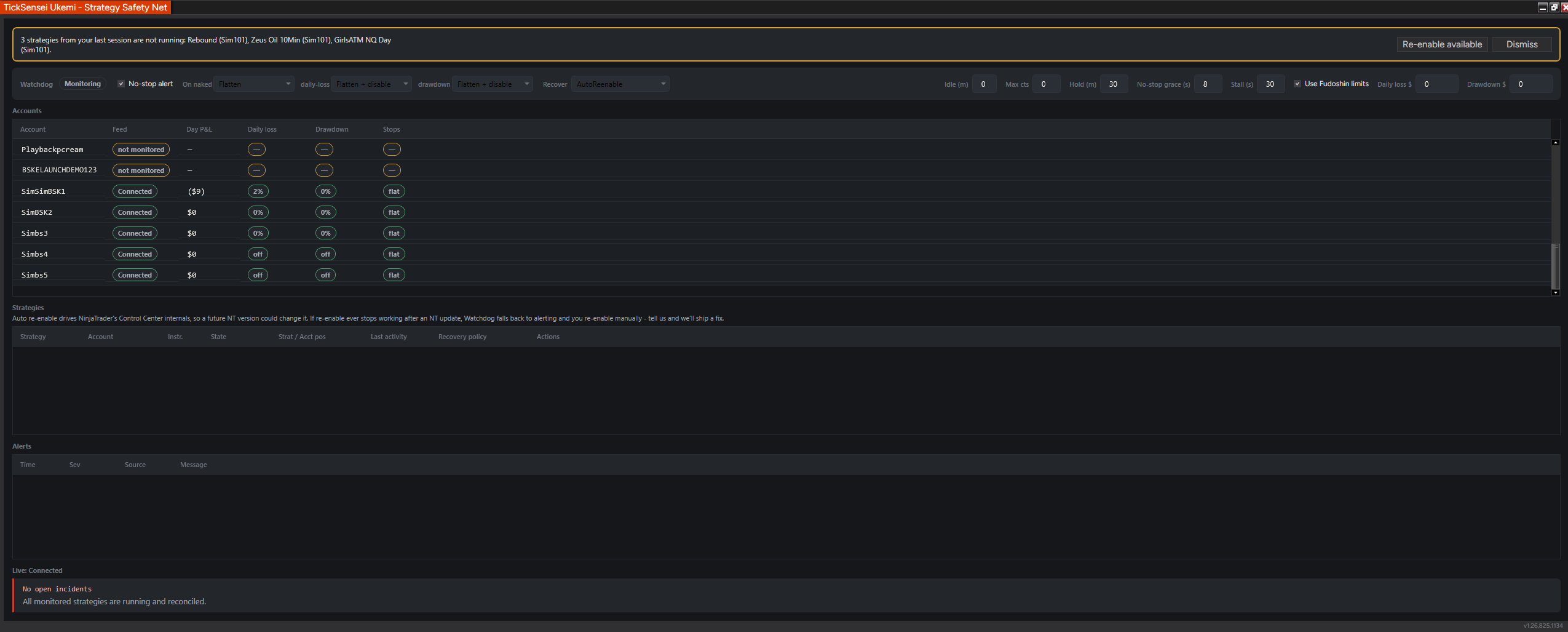 Ukemi at full width. A banner across the top flags strategies from your last session that are not running, with a one-click re-enable.
The settings bar
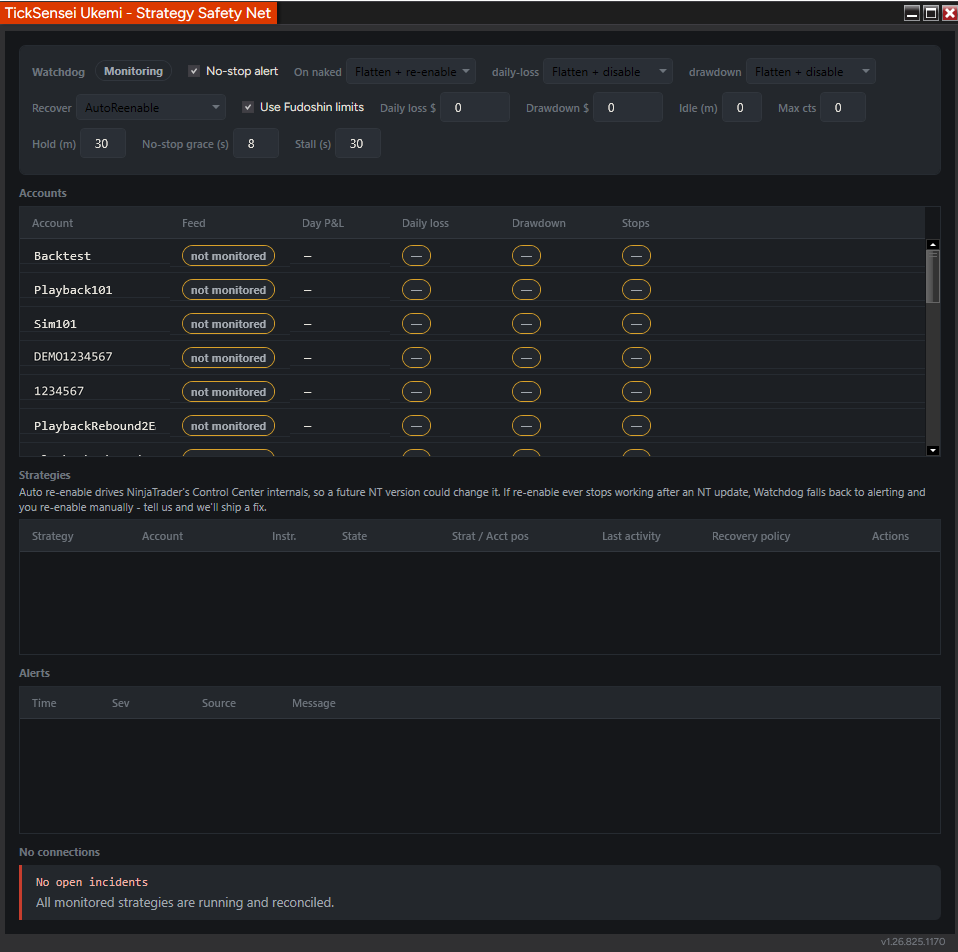 The same controls in a narrower window. The bar wraps rather than truncating.
Per-failure actions
Three dropdowns, one per failure class. Each offers alert-only, flatten, disable, or a combination.
| Setting | Fires when | Sensible choice |
|---|---|---|
| On naked | An open position has no protective stop, after the grace period. | Flatten + re-enable if your strategy reliably places its own stops. Flatten if you are not sure. |
| daily-loss | Today’s loss reaches the configured daily-loss figure. | Flatten + disable. There is no case for continuing. |
| drawdown | Equity approaches the trailing drawdown floor. | Flatten + disable. |
No-stop grace (s) is how long a position may exist without a stop before the naked rule fires. Eight seconds is a good default: long enough for a bracket to attach after a fill, short enough that a genuinely naked position does not sit there.
Recovery policy
Recover sets what happens when a strategy is found disabled:
- AlertOnly: tell you, change nothing. Start here.
- AutoReenable: turn the strategy back on, but only when the strategy’s position matches the account’s actual position.
- FlattenThenReenable: go flat first, then restart the strategy from a known state.
- FlattenAndStayOff: go flat and leave it off until you intervene.
Three guardrails apply to all of them:
- Never on a mismatch. If the strategy thinks it is flat and the account is long two contracts, Ukemi will not re-enable. It alerts and waits for you. Re-enabling into a desync is how you get two positions fighting each other.
- Connection debounce: 30 seconds after a reconnect before anything is attempted, because a feed that just came back often goes again.
- Flap guard: at most three recovery attempts per rolling hour per strategy. After that it falls back to alerting rather than fighting a broken strategy in a loop.
Auto re-enable drives NinjaTrader’s Control Center internals, so a future NinjaTrader version could change it. If re-enable ever stops working after a NinjaTrader update, Ukemi falls back to alerting and you re-enable manually. Tell us and we will ship a fix.
Limits
Tick Use Fudoshin limits and Ukemi reads the limits Fudoshin is already enforcing, so you configure them in one place. Without Fudoshin, type the dollar figures into Daily loss $ and Drawdown $.
Ukemi’s limit rules are alert-and-act on your terms. Hard enforcement, lockouts, and tilt-proofing are Fudoshin’s job.
Timing controls
- Idle (m): minutes without strategy activity before Ukemi treats it as idle.
- Hold (m): how long a recovery decision holds before it can be revisited.
- Stall (s): seconds without a data tick before the feed counts as stalled. 30 is right for liquid futures during RTH; raise it for thin instruments or overnight.
- Max cts: contract ceiling used by the monitor rules.
The Accounts table
| Column | Reading it |
|---|---|
| Feed | Connected or not monitored. Accounts with no connection, such as Backtest and Playback, show not monitored, which is correct and not an error. |
| Day P&L | Realized plus open for today. |
| Daily loss | Percentage of your daily-loss allowance used, or off if no limit is set for that account. |
| Drawdown | Percentage of drawdown consumed. |
| Stops | flat when there is no exposure, or a warning when a position has no protective stop. |
The Strategies table
One row per strategy NinjaTrader is running, showing its state, its instrument, the strategy position against the account position (the desync check), last activity, and the recovery policy in force. The Actions column gives you per-strategy manual controls: re-enable, flatten, disable.
If the banner at the top says strategies from your last session are not running, Re-enable available restarts them in one click.
Alerts
Everything Ukemi raises goes to the Alerts panel and, if you have it, out through Kiai to your phone. This is the pairing that matters: Ukemi is most valuable when you are not looking at the screen, which is exactly when an on-screen alert is useless.
Incidents are also written to a journal on disk, so you can reconstruct what happened after the fact.
A configuration that works
Week one, learning:
- Recover:
AlertOnly - On naked:
Flatten - daily-loss and drawdown:
Flatten + disable - No-stop alert on, grace 8s, stall 30s
- Kiai rule: critical alerts to Telegram
After a week of watching it call the failures correctly, move Recover to AutoReenable. Ukemi’s own guardrails, position match plus debounce plus flap guard, are what make that safe.
Troubleshooting
Everything says not monitored. No connected accounts. Backtest, Playback, and disconnected sim accounts always show this.
The strategies table is empty. No strategies are running in NinjaTrader. Ukemi enumerates NinjaTrader’s live strategies; if the Control Center Strategies grid is empty, so is this.
A strategy will not auto re-enable. Almost always a position mismatch, which Ukemi refuses to re-enable through by design. Check the Strat / Acct pos column, square the position by hand, and it will recover on the next pass. Otherwise you may have hit the three-per-hour flap guard.
Naked-position alerts on every fill. Your grace period is shorter than the time your bracket takes to attach. Raise No-stop grace (s).
Stall alerts overnight. Thin overnight volume can exceed a 30-second stall window legitimately. Raise Stall (s) or accept the noise.
Related
- Fudoshin - Risk Guardian: hard enforcement and tilt-proof lockouts
- Kiai - Alert Bridge: get Ukemi’s alerts off the desktop
- Honbu - Command Center: the manual override when you want out of everything at once
Estimates and tooling only. Your prop firm's published rules are always authoritative, and nothing here is financial advice. Questions? support@ticksensei.com